Skip to content
IM Warehouse Advanced

IM Warehouse Advanced

Help & FAQs

IM Warehouse Advanced
Help & FAQs

Getting Started

  • Getting Started
  • Licensing
  • Demo – Device Login

Application Setup in Business Central

  • Application Setup
  • Locations
  • Warehouse Employees
  • Label and Printing Configuration

IM Warehouse Advanced Android App

  • Initial Screen
    • Main Screen
  • Stock
    • Stock Menu
    • Item Stock
  • Transfers
    • Transfers Menu
    • Transfer Request
    • Warehouse Receipts
    • Warehouse Picking
    • Warehouse Put-away
  • Purchases
    • Purchases Menu
    • Warehouse Receipts
    • Warehouse Put-Aways
    • Purchase Order Directed
    • Purchase Order
    • Return Order
    • Barcodes
  • Sales
    • Sales Menu
    • Packing
    • Warehouse Picking
  • Tasks
    • Tasks Menu
    • Tasks
  • Stock Adjustment
    • Stock Adjustments Menu
    • Stock Adjustments
  • Inventory
    • Inventory Menu
    • Inventory
    • Picking Movement
  • Labels
    • Labels

FAQs

  • FAQs

Support

  • Support
View Categories
  • Home
  • IM Warehouse Advanced
  • IM Warehouse Advanced Android App
  • Sales

Packing

< 1 min read

Prepare a Packing List selecting Sales Shipments from the same Customer/Shipping Address

PACKING OPERATIONS WITH IM WAREHOUSE

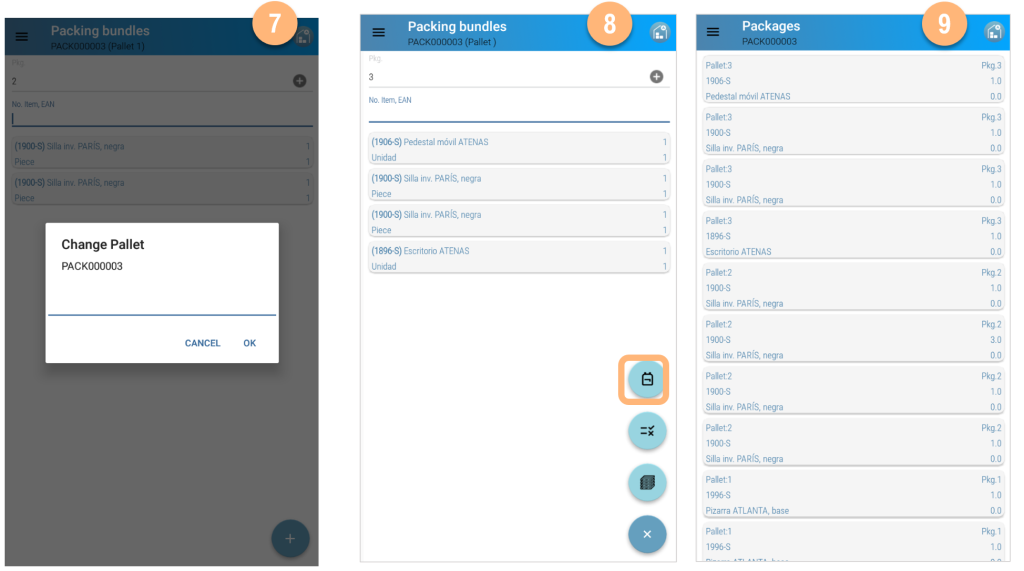
  1. Select Packing Option from the secondary Menu
  2. Create a new Packing List with the + icon
  3. Read or select shipments from a single Customer/Shipping Address
  1. Select all shipments from the Packing List
  2. Select Packages and read items
  3. Change the palet with the corresponding menu option
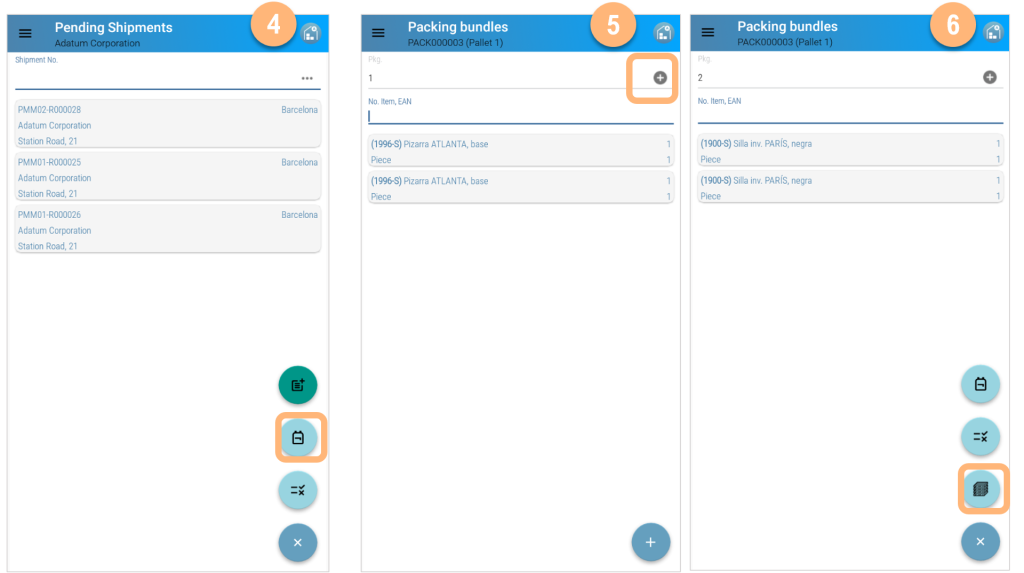
  1. Create a new Pallet with the Change Pallet icon
  2. Create new bundles in the new pallet
  3. Check the Packing List details

PACKING OPERATIONS WITH MICROSOFT DYNAMICS 365 BUSINESS CENTRAL

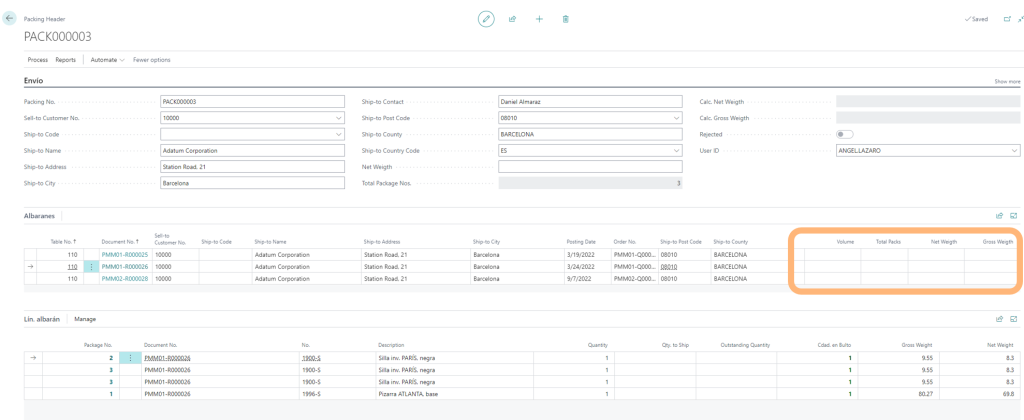
The packing List has to be worked up in Microsoft Business Central; select the document from the Packing option from the main menu.

Select the Packing List and populate the remaining data to be able to print the documentation and labels from Microsoft Dynamics 365 Business Central
Updated on November 22, 2023
Table of contents
  • PACKING OPERATIONS WITH IM WAREHOUSE
  • PACKING OPERATIONS WITH MICROSOFT DYNAMICS 365 BUSINESS CENTRAL

Contact Us

  • info@im-projects.com
  • www.im-projects.com

Explore

  • Getting Started
  • Application Setup
  • Functionality

Help

  • FAQs
  • Support

Legal

  • Terms
  • Privacy
  • Cookies

© 2026 IM Projects  |  Web Design: Dolphin Tecnologías

Scroll to top